 Miotryx






01 OPERATIONAL SYSTEM
Essential tools for efficient business management
By identifying the most critical business pain points, we’ve built a solution that makes these processes simple, seamless, and always at your fingertips:
Main features

Calendar
A high-level "big picture" view of your schedule with daily, weekly, and monthly filtering.

Live Map
See your crew members’ locations in real time and keep track of your team throughout the day.

Finances
Manage all income and expenses in one place. No missed payments and no awkward situations.

Tasks
Move smoothly from new lead to completed job. Get notified as leads arrive, follow up promptly and give every customer the attention they deserve.

Task Overview
Every detail of a job in one place: assigned teams, customer information, move details and all client communications. Keep everyone working from the same information.

Clients
More than a contact list: an organized record of your customers and their history. Use the blacklist to flag clients you do not want to work with again.

Crew & Contractors
Be a dependable partner to your crew and contractors. Keep their information, work history and collaboration organized in one shared workspace.

Manage Contractors
Send and receive invoices, upload them for automatic entry into the system and review past records. Build reliable, mutually beneficial partnerships.

Manage Employees
Keep employee details, earnings and payment history clear and organized. Avoid misunderstandings, treat your team fairly and build lasting working relationships.

Inventory
Manage your vehicles, equipment, and supplies. Truck documents, warehouse locations, and supply stock are all stored in an easy-to-use format.

Marketing & Sales
Your marketing department in one place. Create content, improve conversions with A/B testing, manage ad campaigns and use automated sales scripts tailored to each client.

Reports
Create reports and keep your business documentation organized in an archive, ready whenever you need it.

Integrations
Import contacts from social media and connected platforms into your system. Keep leads organized and make sure no new inquiry gets lost.

Users & Roles
Assign responsibilities, control access and keep your team’s work and leads organized with clear roles and permissions.

Smart Quotes
Automate job estimates with smart formulas and pricing rates you can edit at any time.
That’s not all. Book a demo call to see all of them.
02 AI ASSISTANT
An assistant that knows your business.
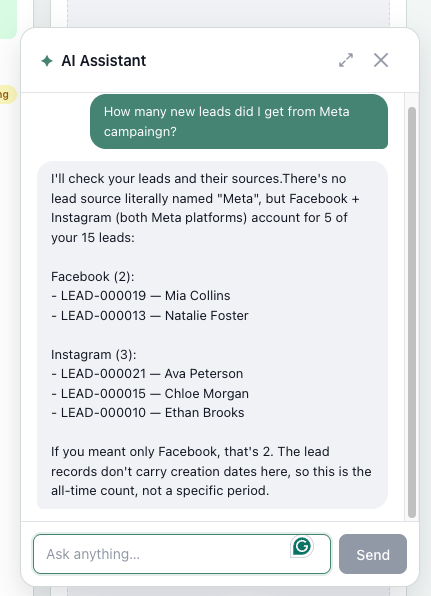
Ask about what is happening across your connected business — from leads and campaigns to employee earnings, contractor payments and your website. Get answers in minutes, without searching through every tool.
- Understand your advertising
Ask “How many leads came from my ad campaigns?”
- Bring new leads into your CRM
Ask “Add the new leads from Messenger and my connected platforms to the CRM.”
- Check employee earnings
Ask “How much did this employee earn last week?”
- Track contractor payments
Ask “How much have we paid this contractor for this job?”
- Evaluate your website tests
Ask “Which website version performed best in our A/B test?”
- Create content
Ask “Create content ideas for our Instagram
Review and confirm proposed changes before they are applied.
03 WEBSITE BUILDER
Your website. Connected to your business.
The tools you expect from a modern website builder, brought together with AI and a direct connection to your Miotryx workspace. Build, publish and improve your site without managing a separate stack of tools.

AI Designer
Create your site in minutes with AI. Describe your vision, sections and requirements, and AI Designer builds it for you. Fine-tune every detail in the visual editor.

Pages, SEO, Blocks & More
Everything a modern website builder needs: flexible blocks, new pages, blogs, backlink exchanges and SEO tools. Build a beautiful site and help customers find it in search.

Visual Guidelines
Keep your brand consistent. Share your existing website and brand guidelines with the AI assistant to create custom buttons, design elements and a design system that feels like you.
A/B Testing
Find out which version of your site performs best. Compare A/B test results, or ask the AI assistant to explain what they mean and help you decide what to improve.
Connect Your Domain
Keep the web address your customers already know. Connect your existing domain to our system and bring your new website to the same familiar address.

Automated Forms
Go beyond contact forms with a built-in calculator that shows an estimated moving price range. Capture the lead’s details, then follow up to discuss the job and provide a more accurate quote.
04 MESSENGER
Every contact. Every channel. One Messenger.
Bring your team, contractors, clients and new leads from Instagram, Facebook, VK and other connected sources into one shared Messenger.
Organize conversations with folders. Move a new lead into your Operational System in one click.
Search chats

Ethan Miller
We’ve arrived at the pickup location and are ready to start loading.

12
10:23

Liam Carter
The truck is fully loaded. We’re heading to the destination now.
12
10:23

Noah Thompson
We’re running about 15 minutes late due to traffic.
10:23

Mason Brooks
All furniture has been wrapped and secured inside the truck.
10:23

Lucas Bennett
We’ve completed the move. The client confirmed everything looks good.
10:23

James Parker
The customer asked us to help pack a few additional boxes.
10:23

Benjamin Reed
We’re waiting for the building manager to open the service elevator.
10:23

Oliver Collins
One large item doesn’t fit through the doorway. Please advise.
10:23


All Chats
Moving Company

2
ThumbTack
Yelp


@liamcarter | Liam Carter

New Lead


TODAY
Hi! I found you on Instagram. Are you available for a move next Saturday?
10:18
✓✓ 10:20
Pickup is in Summerlin, and we’re moving to Henderson.
10:24
It’s a two-bedroom apartment. Could you send me an estimate?
10:42
Absolutely. I’ll prepare a quote and send it here shortly.
✓✓ 10:44

Write a message…


Select Messages

Add to System

Update Lead Info

Mute Chat

Delete Chat
@liamcarter | Liam Carter
New Lead
TODAY
Hi! I found you on Instagram. Are you available for a move next Saturday?
10:18
✓✓ 10:20
Pickup is in Summerlin, and we’re moving to Henderson.
10:24
It’s a two-bedroom apartment. Could you send me an estimate?
10:42
Absolutely. I’ll prepare a quote and send it here shortly.
✓✓ 10:44
Write a message…

Lead info updated successfully!
Go to Tasks

Close
05 CREW APP
The right details. Right in your crew’s hands.
Help your team see assigned jobs, schedules and the information they need before they arrive. Keep the office and field connected.
Assigned jobs · Daily schedules · Job communication
Plan your day

Calendar
Jan 28
Tue
Jan 29
Wed
Jan 30
Thu
8 AM
10 AM
12 PM
2 PM
4 PM
6 PM
8 PM
#2890
8:30 AM · Local move
819 Melrose Pl, Las Vegas, NV
#9203
10:30 AM · In progress
389 Washington Ave, Las Vegas, NV


Calendar

Tasks

Chat

Profile
Day
Week

Walk through every room
Kitchen
3 / 6
Kitchen
Record the full room, then add close-up photos of enclosed spaces.
Room video
Tap to record a room video
Sweep slowly from the doorway and show every item.

Closet and storage photos
Add close-up photos

Notes
Describe fragile items or special access…
Save room
Photo tips ›
Exit
Start work. Track time.
Task #2890
IN PROGRESS
WORK TIME
01:42:18
Started when the crew tapped Start job
Today’s work
Packing
In progress
Loading
Not started
Transport
Not started
Unloading
Not started
+ Add photo or extra
Actual time, materials and extras will update the final invoice in CRM.
Finish Task

Calendar

Tasks
Chat
Profile
Review and sign off
‹ Finish job
TASK #2890
Review actual work
Confirm the work completed on site.
Crew time
3 h 15 min
Materials
Packing supplies
Approved extras
Long carry
Final amount
Calculated in CRM
Customer sign-off
Ask the customer to confirm the completed work.
Sign here
A copy will be saved to this task.
Complete task · Send to CRM
05 CLIENT APP
Work in Progress. Coming soon.